IPTV Smarters Pro remains the most widely used IPTV app in the world, with more than 10 million downloads. Compatible with almost every device (Android, iOS, Smart TV, Fire Stick, PC), it offers an intuitive interface reminiscent of a traditional TV set-top box. To compare it with the other players, see our IPTV apps comparison ; and to prepare the connection, our guide to Xtream codes and M3U links sets out precisely what to enter in each field.
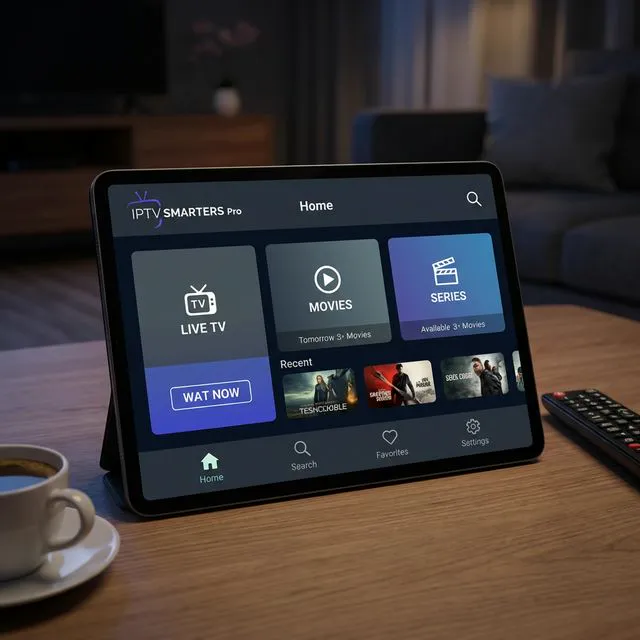
This guide covers installation from A to Z, setup via Xtream Codes, customising the EPG, as well as the tips for getting the most out of your experience.
Why choose IPTV Smarters Pro?
🆓
Free
No app fee on Android. Basic version free on iOS.
Multi-Plateforme
Android, iOS, Fire Stick, Smart TV, Windows and Mac.
Interface TV
Set-top-box-style interface with EPG, favourites, categories and a search engine.
Features principales
Installation on Android / Fire TV Stick
Method 1: via the Google Play Store (Android)
- Ouvrez le Google Play Store from your device
- Recherchez "IPTV Smarters Pro"
- Appuyez on Installer (application free)
- Launch the app once installed
Method 2: by APK / Sideload (Fire TV Stick)
- On your Fire Stick, go to Settings → My Fire TV → Developer Options
- Activez "Apps from Unknown Sources"
- Installez l'application Downloader via the Amazon App Store
- In Downloader, enter the download URL of the IPTV Smarters Pro APK
- Start the download then install the APK
Guide detailed : Install IPTV on Fire Stick
Installation on iPhone / iPad
- Ouvrez l'App Store from your iPhone or iPad
- Recherchez "IPTV Smarters Pro" ou "IPTV Smarters Player"
- Get the free app
- If the app is unavailable, opt for GSE Smart IPTV comme alternative
Complete guide : Install IPTV on iPhone / iPad
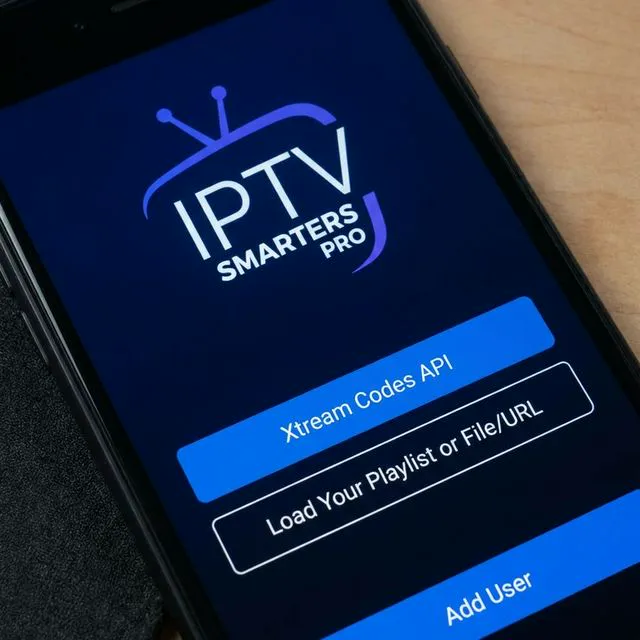
Configuration via Xtream Codes (Recommended)
La method Xtream Codes remains the simplest and most reliable method for linking your IPTV subscription to Smarters Pro:
Launch IPTV Smarters Pro
Start the app. The home screen shows two possible ways to connect.
Choose "Login with Xtream Codes API"
This is the recommended choice. It guarantees the best stability and the most complete features (EPG, Catch-up, VOD).
Enter your credentials
Nom (libre) :
My home IPTV
Server address:
http://your-server.com:port
Username:
votre_username
Your password:
votre_password
These 3 details reach you by email as soon as you order your subscription.
Click "Add User"
The channels load in a few seconds. The main menu then opens on: Live TV, Films, Series and Catch-up TV.
Another method: M3U URL
If your provider has given you an M3U URL rather than Xtream Codes credentials:
- Select "Load your Playlist or File/URL"
- Give the profile a name (e.g. "My IPTV")
- Select "M3U URL"
- Insert your full M3U URL into the field
- Appuyez on "Add the user"
️ Note: M3U mode does not always support Catch-up TV or the EPG. Favour Xtream Codes whenever possible.
Recommended Settings for an Optimal Experience
Lecteur Video
Allez in Settings → Lecteur et select MX Player (Android) or the built-in player. On the majority of Android devices, MX Player delivers better hardware decoding.
EPG (TV Guide)
With Xtream Codes, the EPG loads on its own. If the programmes don't appear, go to Settings → EPG → Refresh EPG. The refresh takes 1 to 2 minutes.
Favoris
Keep your finger pressed on a channel to add it to favourites. Build custom groups (Sport, News, Films…) for quicker access.
Control Parental
In Settings → Parental control, choose a PIN code to block adult channels. Perfect for families.
Auto-Update
Activez les automatic updates in your app store so you benefit from the latest fixes and improvements.
Resolving Common Problems
"Connection failed" or "Server error"
- • Make sure the URL, username and password are exact (copy-paste)
- • Confirm that your internet connection is active
- • Try switching from http:// to https:// (or the other way round)
- • Contactez le support technique
Channel buffering / freezing
- • Replace Wi-Fi with an Ethernet cable
- • Change the video player in the settings
- • Lower the streaming quality (SD rather than HD)
- • Check out our guide against dropouts
The EPG doesn't display
- • Opt for the Xtream Codes connection (not M3U)
- • Go to Settings → EPG → Refresh
- • Wait 2 to 3 minutes for it to fully load
The app crashes on launch
- • Clear the cache: Phone settings → Apps → IPTV Smarters → Clear cache
- • Delete then reinstall the app
- • Make sure your device has enough free memory
IPTV Smarters Pro on Every Platform
The main strength of IPTV Smarters Pro is its universal availability : with a single set of Xtream Codes credentials, you install and set up the app in an identical way on all your devices. Here are the specifics of each platform:
On iPhone and iPad (iOS)
Free download on the App Store. AirPlay 2 built in to stream to an Apple TV or a compatible TV. Offline download possible for VOD. Compatible with iOS 13+. Very stable, with regular updates.
🤖 On Android and Android TV
Available on the Google Play Store. On Android TV, the interface is designed for the remote. Chromecast supported natively. Compatible with Android 7+. Effective even on entry-level boxes.
Amazon Fire TV Stick
Available directly in the Amazon store (type "IPTV Smarters Pro"). Installed in 30 seconds. Compatible with Fire Stick Lite, 4K and 4K Max. HEVC hardware decoding for 4K.
Samsung and LG Smart TVs
The IPTV Smarters Lite version is found in the Samsung App Store (Tizen) and the LG Content Store (webOS). A pared-back but fully functional interface with Xtream Codes API. As an alternative: the web version at web.iptvsmarters.com.
Windows and Mac (PC)
Download via the official site iptvsmarters.com or the Microsoft Store (Windows). Compatible with Windows 10/11 and macOS 10.15+. Ideal for working from home, it lets you watch while using other applications.
The Universal Web Version
Opens from any browser at web.iptvsmarters.com. With no installation at all. Handy on older Smart TVs, on a shared computer or for a quick trial before buying a licence.
Xtream Codes API or M3U URL in IPTV Smarters Pro
IPTV Smarters Pro allows two connection modes to your IPTV service: the Xtream Codes API protocol (modern) and the simple M3U link (old format). This choice has a direct impact on the user experience:
| Feature | Xtream Codes API | URL M3U |
|---|---|---|
| Sorting by category | Sorted automatically | Liste plate |
| VOD (films and series) | Separate section | Mixed in with live |
| EPG dynamique | Fast and comprehensive | Basic when available |
| Synchronised favourites | Cloud | Locaux uniquement |
| Statut compte | Expiration visible | Aucune info |
| Compatibility legacy | Apps modernes | All apps (VLC, Kodi) |
Conclusion : on IPTV Smarters Pro, favour Xtream Codes API systematically if your provider offers it. M3U mode is only useful for third-party apps like VLC, which are incompatible with Xtream. Our EzzeTV offer provides both methods: select the first when you subscribe.
IPTV Smarters Pro Troubleshooting Table
The seven incidents most reported to support in 2026 and their tested solution:
“Authentication failed”
Server URL ending with a slash, credentials with different capitalisation or a subscription that has ended. Reproduce the email you received faithfully and check the expiry date in your customer account.
Constant buffering in 4K
Bandwidth too low (< 25 Mbps) or an overloaded 2.4 GHz Wi-Fi. Switch to Ethernet or 5 GHz Wi-Fi, and enable hardware decoding (Hardware Decoder) in Settings > Player.
No sound on some channels
EAC3 audio codec not supported. In Settings > Player > Audio, choose "Automatic Passthrough" or "PCM" depending on your audio equipment.
Black screen but the sound works
HEVC or HDR incompatibility. Turn off hardware decoding or ask the provider for an H.264 stream. On a few older Smart TVs, the issue often recurs.
EPG introuvable
XMLTV EPG not set up on the server side or a damaged local cache. Go to Settings > EPG > Refresh, or clear the app cache then reconnect.
"Account already connected"
Number of simultaneous connections exceeded. Fully close the app on the other devices or request a session reset from support.
The app closes on launch
Cache too heavy or a conflict following an update. Delete the app, restart the device, reinstall then re-enter your credentials. Your favourites will disappear.
FAQ — IPTV Smarters Pro
L'team EzzeTV
IPTV and streaming specialistsStreaming and IPTV experts in the UK, our editorial team tests and compares services, apps and devices every day so we can offer you reliable, up-to-date guides that are true to the reality of the UK market in 2026.
Ready to Switch to IPTV Smarters Pro?
Take out your IPTV subscription and start watching in 5 minutes.
Discover our Subscriptions