IPTV is transforming the way Britons watch television. Gone are the overpriced cable subscriptions, temperamental aerials and limited packages: with IPTV, you get access to more than 36,000 channels from around the world, films, series and live sport, all from any connected device.
But if you've never tried IPTV, the concept can seem complicated. What exactly is it? What equipment do you need? How do you set it up? Is it reliable? Is it legal?
This guide has been designed to answer every question a complete beginner might have. In 5 minutes of reading, you'll master the essentials to get started with complete peace of mind. No complicated technical terms or waffle: just the must-know information.
1. What Is IPTV? A Simple Explanation
The definition in one sentence:
IPTV (Internet Protocol Television) = watching television over the internet rather than via an aerial or satellite.
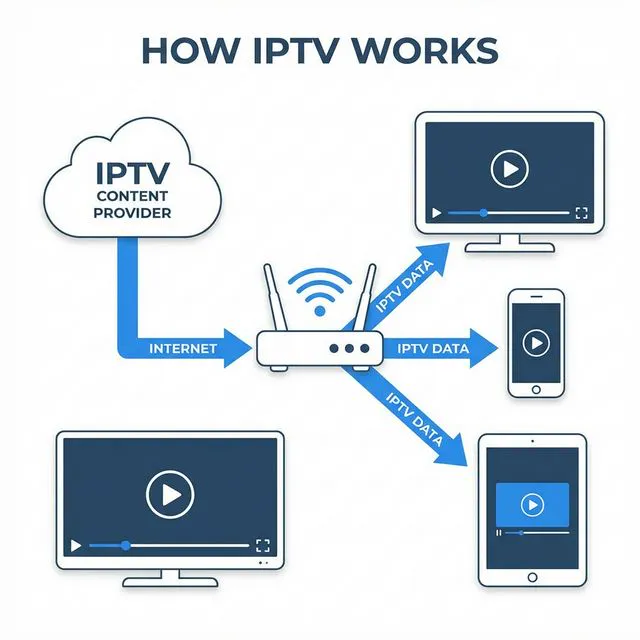
To understand it properly, imagine your IPTV provider works like a giant satellite package; but instead of delivering the channels via a dish, it transmits them through your internet connection. The result is the same — you watch TV on your screen — only the delivery technology changes.
In practical terms, here's how it works:
The IPTV provider gathers the TV channels
It collects the feeds of thousands of international channels then converts them into internet streams.
The streams pass through servers
Powerful servers broadcast the channels 24/7 over the internet, much like YouTube or Netflix do for their videos.
You receive them on your device
An app installed on your TV, phone or box picks up these streams and displays them like ordinary TV channels.
It's as simple as that! There's no need to master the technical detail to enjoy it, just as you don't need to understand a satellite to watch Sky.
2. IPTV vs Traditional TV: What Are the Differences?
To really grasp IPTV, let's compare it with the methods you already know:
| TNT / Antenne | Box Internet | Netflix & co | IPTV | |
|---|---|---|---|---|
| Channels live | 27 channels | ~200 channels | Non | 36 000+ |
| Films & Series on VOD | Non | Basique | Limited catalogue | 80 000+ |
| Replay | Non | 7 days | No (VOD only) | 14 days |
| Multi-devices | 1 TV | 1 set-top box | Multi-screen | 2-4 screens |
| Prix monthly | Free | 30-£80 | 6-£20 (chacun) | From £10.99 |
| Live sport | L'Team only | En option | Limited | All inclus |
En highlights : IPTV brings together the best of each method: the live element like Freeview, the wide choice of internet boxes and Netflix-style VOD. All in a single app, at an unbeatable price.
3. What Do You Need to Get Started?
Good news: you probably already have the essentials! Here's the complete checklist:
An internet connection
Minimum 10 Mbps for HD and 25 Mbps for 4K. Most broadband/fibre connections in the UK are suitable. To check, type "speed test" into Google.
A compatible device
Any one of these devices will do the job:
Smartphone
Android / iPhone
Smart TV
Sony / Samsung / LG
Fire TV Stick
Amazon
Box Android
Nvidia Shield / Xiaomi
PC / Mac
Windows / macOS
iPad / Tablette
iOS / Android
An IPTV plan
This is your "key" to accessing the channels. From £10.99/month, you enjoy the entire catalogue. See our offers →
An IPTV app (free)
The app that displays the channels on your screen. Among the best known: IPTV Smarters Pro et TiviMate. They're free and install in a few seconds.
Inutile d'having : no aerial, dish, special decoder, access card, professional installer, or the slightest technical skill. If you know how to install an app on your phone, you'll know how to set up IPTV.
4. Step-by-Step Installation (5 Minutes Flat)
Here's exactly how to set up IPTV, step by step. Allow 5 to 10 minutes at most:
Choose your subscription
Head to our page subscriptions and go for the plan suited to your needs. To begin with, the 1-month plan is perfect. You can also order it.
Retrieve your login details
Once the order is placed, your login details reach you straight away by email. There are three elements: a URL, un username et un password.
Download the app
Depending on your device, install the recommended app:
- • Fire TV Stick / Android: TiviMate or IPTV Smarters Pro
- • iPhone / iPad : GSE Smart IPTV or IPTV Smarters Pro
- • LG/Samsung Smart TV: IPTV Smarters or Smart IPTV (SIP)
- • PC / Mac : IPTV Smarters or VLC Media Player
Enter your login details
Launch the app, select the "Xtream Codes" login method and fill in the 3 details received by email: URL, username, password. Tap "Log in".
C'est ready !
The channels load by themselves, sorted into categories (UK, Sport, Cinema, International…). Browse the list and channel-hop as you would on a traditional set-top box.
For detailed installation tutorials with screenshots by device, see our tutoriels d'installation.
5. What Can You Watch with IPTV?
An IPTV subscription opens up a world of content far vaster than any traditional TV package:
Live Channels
- 27 channels TNT UK
- Sky Sports, TNT Sports, Premier Sports
- Film channels (Sky Cinema, Film4, TCM…)
- International channels (more than 50 countries)
- Rolling news channels
- Kids' and documentary channels
VOD (Series & Films)
- 192,000+ films and series
- New releases every week
- Films in original and subtitled versions
- Complete series (all seasons)
- Quality up to 4K
- Genres: action, comedy, kids…
Live Sport
- Premier League, Championship
- Champions League, Europa League
- The Liga, Serie A, Premier League
- Rugby, Tennis, Basketball, MotoGP, F1
- Boxing, UFC, US Sports
Catch-up / Replay
- Replay 7 à 14 days
- EPG (TV programme guide)
- Live control (pause/resume)
- Recording (depending on the app)
6. What Internet Connection Do You Need?
IPTV relies on your internet connection to stream the channels. The speed required varies according to the picture quality you're after:
SD (480p) — Basic quality
Fine for viewing on a smartphone. Picture is acceptable but not very sharp on a big screen.
HD (720p) — Good quality
Recommended for most users. Sharp picture on a television.
Full HD (1080p) — Excellent quality Recommended
Flawless picture on all screens. Most fibre connections allow it.
4K Ultra HD (2160p) — Cinematic quality
For 4K TVs. Requires fibre. Immersive experience guaranteed.
Conseil pratique : Always go for a wired connection (Ethernet cable) rather than Wi-Fi to ensure optimal stability. If Wi-Fi is your only option, move your device as close as possible to the router. To learn more, see our anti-buffering guide for IPTV.
7. Which Subscription Should You Choose to Get Started?
For a beginner, here's our step-by-step advice:
💬 Step 1: Order on WhatsApp
Start by ordering the 1-month plan: you pay nothing on the website, an agent sends you a PayPal or card payment link, then your access and setup help.
Step 2: The 1-Month Subscription
Use this first month at £10.99 to assess the quality, check compatibility with your device and browse the catalogue, with no annual commitment and no automatic renewal. Satisfaction guaranteed or your money back within 30 days.
Step 3: The Annual Subscription (Lowest Price)
Once you're won over, go for the annual subscription to get the best price : from £10.99 to £4.16/month depending on the plan. You save up to 70% compared with the monthly price.
Our guarantee: Every one of our subscriptions includes a 30-day money-back satisfaction guarantee, technical support 7 days a week and free updates. You take no risk at all.
8. Beginner Mistakes to Avoid
To get the most out of your IPTV experience right from the start, steer clear of these common mistakes:
Mistake 1: Making do with a weak Wi-Fi signal
Wi-Fi picked up at the far end of the house causes freezing and dropouts. Go for an Ethernet cable or move closer to the router.
Mistake 2: Choosing an unknown low-cost provider
The £2/month offers rely on overloaded servers with constant dropouts. Bank on a quality service with reliable servers.
Mistake 3: Neglecting app updates
IPTV apps are updated regularly to improve stability. Enable automatic updates.
Mistake 4: Failing to set up the EPG
The EPG (programme guide) noticeably improves the experience by showing what's on each channel. Make sure it's enabled in your app's settings.
Mistake 5: Panicking when there's a problem
A black screen or an occasional freeze is normal and often clears up by switching channels then coming back, or by restarting the app. Our support technique is also here to help you.
9. For Approfondir
Now that you've got the basics of IPTV, here are the next steps to broaden your knowledge:
Tutoriels d'Installation
Step-by-step tutorials with screenshots for Fire Stick, Android, iPhone, Smart TV...
VPN for IPTV
Protect your privacy and optimise your IPTV experience with a VPN.
IPTV with No Dropouts
Fine-tune your connection for a smooth stream with no freezing.
The Complete IPTV Guide
Our complete guide covering every aspect of IPTV in detail.
Frequently Asked Questions — Getting Started with IPTV
What exactly is IPTV?
Do you need any special equipment?
How much does an IPTV subscription cost?
Is installation complicated?
How is it different from Netflix or Disney+?
What is the best way to start?
Ready to Dive into IPTV?
1 month at £10.99 • 36,000+ channels • 5-min setup • Support 7 days a week • 30-day guarantee
L'team EzzeTV
IPTV and streaming specialistsAs streaming and IPTV experts in the UK, our editorial team tests and compares services, apps and devices every day to bring you reliable, up-to-date guides that stay true to the reality of the UK market in 2026.
Related Articles
The Complete IPTV Guide
Understand everything about IPTV in the UK.
1-Month IPTV Plan at £10.99
Try EzzeTV for a month at £10.99.
Best IPTV in the UK 2026
Our comparison of IPTV services.
IPTV plan comparison
Find the right plan.
Legal IPTV in the UK 2026
Legal framework and best practice.