
Recommended Minimum Speeds by Resolution
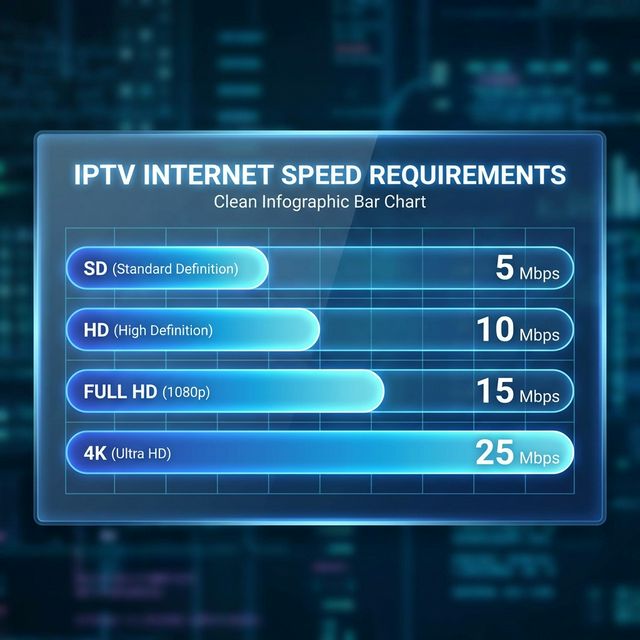
The speed required varies according to the target picture quality and the number of devices connected at the same time. Here are the real descendants (download) speeds needed — careful: the real speed often turns out to be 20-40% below the theoretical speed advertised by your ISP.
| Resolution | Bitrate / flux | 1 screen | 2 screens | 4 screens | Data/heure |
|---|---|---|---|---|---|
| SD (480p) | 3-5 Mbps | 5 Mbps | 10 Mbps | 20 Mbps | ~1,5 Go |
| HD (720p) | 5-8 Mbps | 10 Mbps | 20 Mbps | 35 Mbps | ~2,2 Go |
| Full HD (1080p) | 8-15 Mbps | 15 Mbps | 30 Mbps | 60 Mbps | ~3 Go |
| 4K UHD | 25-35 Mbps | 35 Mbps | 70 Mbps | 140 Mbps | ~7 Go |
| 4K HDR/DV | 35-50 Mbps | 50 Mbps | 100 Mbps | 200 Mbps | ~10 Go |
Important : These values represent the strict minimum for comfortable use, with no other internet activity in parallel. If other people connect at the same time (online gaming, downloading, video calls), allow an extra 20-30 Mbps of headroom.
Fibre vs ADSL vs 4G/5G: Which Connection for IPTV?
Fibre Optique
- Speed: from 300 Mbps to 8 Gbps
- Latence : 2-10 ms
- Stability: Excellent
- Multi-screen 4K : Parfait
Recommended for 4K IPTV
ADSL / VDSL2
- Bitrate : 1-30 Mbps
- Latence : 20-50 ms
- Stability: variable (depending on distance)
- Multi-screen 4K : Insuffisant
Suitable for HD, on 1 screen only
4G / 5G Fixe
- Bitrate : 30-300 Mbps (5G)
- Latence : 20-80 ms
- Stability: variable (depending on network)
- Multi-screen 4K : ️ 5G oui
Alternative in areas without fibre
The major French ISPs offer FTTH fibre with speeds amply sufficient for multi-screen 4K IPTV:
| Operator | Plan Fibre | Bitrate descendant | Prix | IPTV 4K |
|---|---|---|---|---|
| Orange | Virgin Media Hub Max | 2 Gbps | £32.99/month | Parfait |
| Free | Sky Q Ultra | 8 Gbps | £49.99/month | Parfait |
| SFR | SFR Fibre Premium | 2 Gbps | £34.99/month | Parfait |
| Bouygues | Bbox Ultym | 2 Gbps | £30.99/month | Parfait |
Wi-Fi vs Ethernet vs Powerline: How to Connect Your IPTV Box?
The link between your router and your IPTV device is often the weak link. Here are the connection options ranked by performance:
1. Ethernet Cable (RJ45) — The Essential
Direct link between the router and the IPTV box via a Cat 5e or Cat 6 Ethernet cable. It's the most reliable option: stable speed, minimal latency (~1-3 ms), no interference. A 10-metre cable costs around £10. It's always our first recommendation for l'IPTV 4K.
2. Wi-Fi 5 GHz (Wi-Fi 5/6/6E) — Decent
Wi-Fi 5 GHz delivers better speeds than 2.4 GHz, but with a shorter range. Wi-Fi 6 (802.11ax) handles the multiplicity of devices better thanks to OFDMA and MU-MIMO. For HD, it's fine. For 4K, move the IPTV device closer to the router (2-3 rooms at most) and avoid thick walls.
3. Powerline (PLC) — Fallback Solution
Powerline adapters use the electrical network to carry data. Models advertised at 2000 Mbps reach ~200-400 Mbps in reality. Enough to cover Full HD, even 4K depending on the quality of the electrical wiring. Avoid power strips and plug directly into a wall socket. A Powerline kit costs £40-80.
4. Mesh Wi-Fi — Ideal for Large Homes
A Mesh Wi-Fi system (TP-Link Deco, Google Nest WiFi, Netgear Orbi) deploys a single Wi-Fi network throughout the house. Perfect beyond 100 m² or for several floors. Price: £150-300 for a kit of 3 units. Compatible with 4K IPTV provided the units are well placed.
How to Assess Your Connection for IPTV
Before taking out an IPTV subscription, make sure your connection is up to the job. Here's the procedure in 4 steps:
Measure the download speed
Allez on speedtest.net ou fast.com (Netflix tool). Run the test from the device that will be used for IPTV. Note the download speed — that's the decisive parameter.
Check the ping and jitter
The ping (latency) must stay under 50 ms. The jitter (latency variation) must stay under 20 ms. High jitter causes micro-interruptions and intermittent buffering, even with a good speed.
Test at peak times
Speed fluctuates depending on the time. Run the test at 10am, 8pm and at the weekend in the evening. In France, the consumption peak is between 8pm and 11pm — precisely when you're watching TV. The speed at 8pm must stay sufficient (it can drop by 30-50% compared with the morning, especially on ADSL).
Compare Wi-Fi and Ethernet
Run the test on Wi-Fi then via an Ethernet cable. If the gap exceeds 50%, your Wi-Fi is to blame. Opt then for an Ethernet cable, a Powerline or a Mesh system.
10 Anti-Buffering Tips for IPTV
If the buffering persists despite a theoretically sufficient speed, here are the 10 most effective solutions, ranked by impact:
1. Switch to Ethernet
Impact : — Solves 60% of problems
2. Restart your router
Impact : — Frees the memory and clears the cache
3. Change the DNS (Google/Cloudflare)
Impact : — DNS 8.8.8.8 ou 1.1.1.1
4. Switch to Wi-Fi 5 GHz
Impact : — Less interference than 2.4 GHz
5. Clear the IPTV app's cache
Impact : — Settings > Apps > IPTV > Clear cache
6. Lower the quality (HD rather than 4K)
Impact : — Cuts the bandwidth needs by 3
7. Close background apps
Impact : — Downloads and updates running in the background
8. Use a fast VPN
Impact : — If your ISP throttles IPTV
9. Increase the buffer size
Impact : — From the player's advanced settings
10. Opt for another IPTV player
Impact : — TiviMate handles buffering better
Check out our complete anti-buffering IPTV guide for a detailed diagnosis of each problem.
Recommended Speed by Video Quality and Codec
The speed required depends on two parameters: the resolution (SD, HD, FHD, 4K) and the codec used (the older H.264 or the modern H.265 / HEVC). Here are the real values recorded in 2026 on French IPTV streams:
| Quality | Resolution | Codec H.264 | Codec H.265 (HEVC) | Recommended stable |
|---|---|---|---|---|
| SD | 480p | ~2 Mbps | ~1 Mbps | 5 Mbps |
| HD | 720p | ~5 Mbps | ~3 Mbps | 8 Mbps |
| Full HD | 1080p | ~8 Mbps | ~5 Mbps | 15 Mbps |
| 4K UHD | 2160p | ~35 Mbps | ~18 Mbps | 25 Mbps |
| 4K HDR | 2160p + HDR | ~50 Mbps | ~25 Mbps | 35 Mbps |
The H.265 (HEVC) codec halves the bandwidth needed compared with the older H.264, at equal visual quality. That's why a modern 4K stream makes do with 18 Mbps in HEVC where it required 35 in H.264. Serious IPTV providers now encode their 4K streams in H.265, making 4K accessible from standard 100 Mbps fibre.
Fibre, ADSL, Fixed 5G, Starlink: Which Connection to Favour for IPTV?
Fibre FTTH
The very best: speeds from 300 Mbps to 8 Gbps, latency <5 ms, negligible jitter. Multi-screen 4K HDR without the slightest problem. It's the perfect solution for IPTV in 2026.
Price: £25–50/month (Orange Fibre, Free Fibre, SFR Fibre).
ADSL / VDSL
15 to 80 Mbps depending on the distance to the DSLAM. Enough to feed 1 screen in Full HD, right at the limit for 4K. Latency can soar at peak times.
Price: £25–35/month. Only to be considered if fibre isn't available.
Fixed 5G (Bouygues 5G Box, Orange 5G Home)
100 to 1,000 Mbps depending on the area, latency 10–20 ms, variable jitter. An excellent alternative to fibre when it's slow to arrive. Keep an eye on any data limits at peak times.
Cost : 30–£40/month.
️ Starlink (satellite)
100 to 250 Mbps in the UK, latency 25–50 ms (LEO). A solution for not-spots. The latency remains acceptable for IPTV, but the monthly cost is high.
Price: £50–80/month + hardware ~£400.
Frequently Asked Questions — Internet and IPTV
L'team EzzeTV
IPTV and streaming specialistsStreaming and IPTV experts in the UK, our editorial team tests and compares services, apps and devices every day to bring you reliable, up-to-date guides that are true to the reality of the French market in 2026.
Try EzzeTV for 1 Month at £10.99
Check the compatibility with your connection • No commitment • HD/4K/Multi-screen
Order 1 Month at £10.99